Adding depth
Once you have a sketch, you want to add some depth to it. replicad offers all the standard methods to do this.
You can find the detailed API documentation here
Extrusion
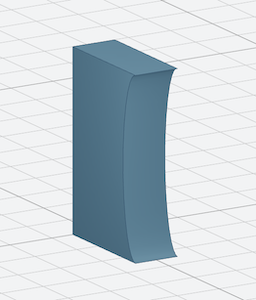
The simplest way to "add depth" is to take the face that we have and add thickness, to extrude it in other words.
const { draw } = replicad;
const main = () => {
  return draw()
    .hLine(25)
    .halfEllipse(0, 40, 5)
    .hLine(-25)
    .close()
    .sketchOnPlane("XZ")
    .extrude(10);
};
This is exactly what we have done, but added a depth of 10mm.
Variations on the extrusion
We can play a bit with the extrusion as well, in addition to the extrusion length we can change:
- the direction of the extrusion (by default normal to the sketching plane),
.extrude(10, { extrusionDirection: [0, 1, 0.5] }) - add a twisting motion to the shape (angle in degrees)
.extrude(10, { twistAngle: 10 })
Revolution
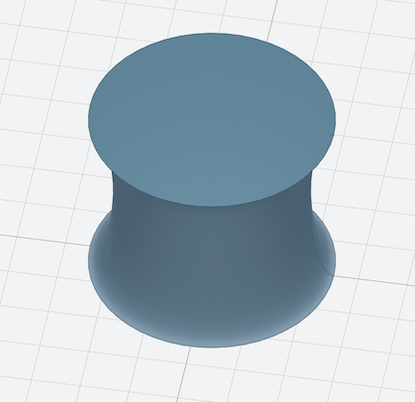
Let's make this shape rotate on an axis, which is, by default the Z axis
const { draw } = replicad;
const main = () => {
  return draw()
    .hLine(25)
    .halfEllipse(0, 40, 5)
    .hLine(-25)
    .close()
    .sketchOnPlane("XZ")
    .revolve();
};
Loft
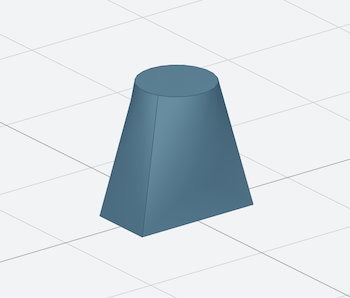
With a loft we make a smooth transition between two sketches (simple ones, different from the one we had before).
const { drawRoundedRectangle, drawCircle } = replicad;
const main = () => {
  const rect = drawRoundedRectangle(5, 10).sketchOnPlane();
  const circle = drawCircle(3).sketchOnPlane("XY", 10);
  return rect.loftWith(circle);
};
Variations on the loft
You can also play a bit with the loft.
- By adding a point at the end (or the start) of the loft:
const { drawRoundedRectangle, drawCircle } = replicad;
const main = () => {
  const rect = drawRoundedRectangle(5, 10).sketchOnPlane();
  const circle = drawCircle(3).sketchOnPlane("XY", 10);

  return rect.loftWith(circle, { endPoint: [2, 2, 15] });
};
- By having multiple lofted sketches
const { drawRoundedRectangle, drawCircle } = replicad;
const main = () => {
  const rect = drawRoundedRectangle(5, 10).sketchOnPlane();
  const circle = drawCircle(3).sketchOnPlane("XY", 10);
  const rect2 = drawRoundedRectangle(5, 10, 1).sketchOnPlane("XY", 20);

  return rect.loftWith([circle, rect2]);
};
Practicing with the watering can tutorial
You can have a look at a practical example of using the drawing API with the watering can tutorial